


Download Speedy Password – Secure Password Manager, Master Password Generator, 256-bit AES Encryption
Overview
Speedy Password is a mobile application designed to help users manage their digital credentials securely and efficiently. Built with the needs of modern internet users in mind, the app provides a centralized platform for storing and accessing login information with a strong emphasis on privacy and protection. Its core purpose is to eliminate the risks associated with weak or reused passwords by offering a robust master password system. This makes it particularly useful for individuals who manage multiple online accounts across social media, banking, email, and e-commerce platforms.
The app addresses common security challenges such as password fatigue, data breaches, and unauthorized access by allowing users to generate and store complex, unique passwords without the burden of memorization. It is ideal for both casual users and tech-savvy individuals who prioritize digital safety but may lack the technical knowledge to implement advanced security measures independently.
Although the developer did not provide additional background information, the app has been available since its release on September 10, 2015, indicating a long-standing presence in the digital security space. This longevity suggests consistent maintenance and user trust over time. Real-world use cases include securing personal accounts, protecting business logins, and simplifying access to frequently used services while maintaining high security standards.
Within the broader app ecosystem, Speedy Password fills a critical gap in personal cybersecurity by combining password generation, secure storage, and encryption in a single, accessible tool. Its focus on user autonomy and data privacy positions it as a valuable utility for anyone seeking to strengthen their online identity protection.
Key Features & Functionality
Speedy Password offers a suite of features aimed at enhancing digital security and user convenience. Each functionality is designed with practicality and safety in mind, ensuring that users can manage their credentials without compromising on protection.
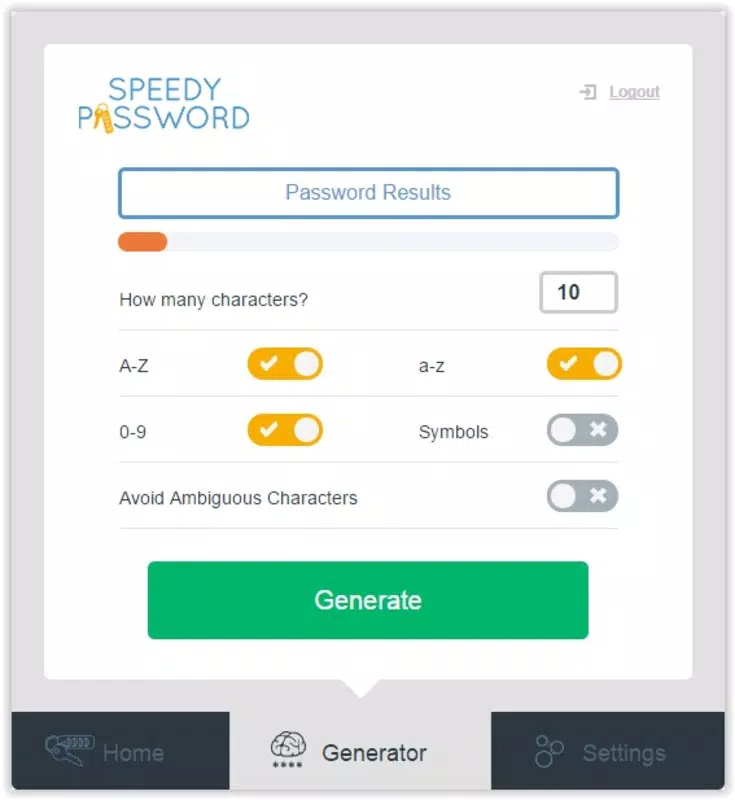
- Customizable Master Password Generation: Users can define the complexity of their master password by selecting character types—uppercase letters, lowercase letters, numbers, and special symbols—and setting a preferred length. This allows for the creation of highly secure passwords tailored to individual risk tolerance and security needs.
- Autonomous Password Management: Once the master password is set, the app remembers it during the active session, enabling seamless access to saved credentials across different websites and platforms. This eliminates the need to re-enter the master password repeatedly, improving usability without sacrificing security.
- 256-bit AES Encryption: All stored data is protected using industry-standard 256-bit Advanced Encryption Standard (AES) encryption. This ensures that even if the data were accessed, it would remain unreadable without the correct decryption key, and the app itself cannot retrieve the stored passwords.
- Integrated News Access: Beyond password management, the app provides direct access to news feeds from major media outlets and social networks. This feature allows users to stay updated on current events without switching between multiple apps, streamlining their digital workflow.
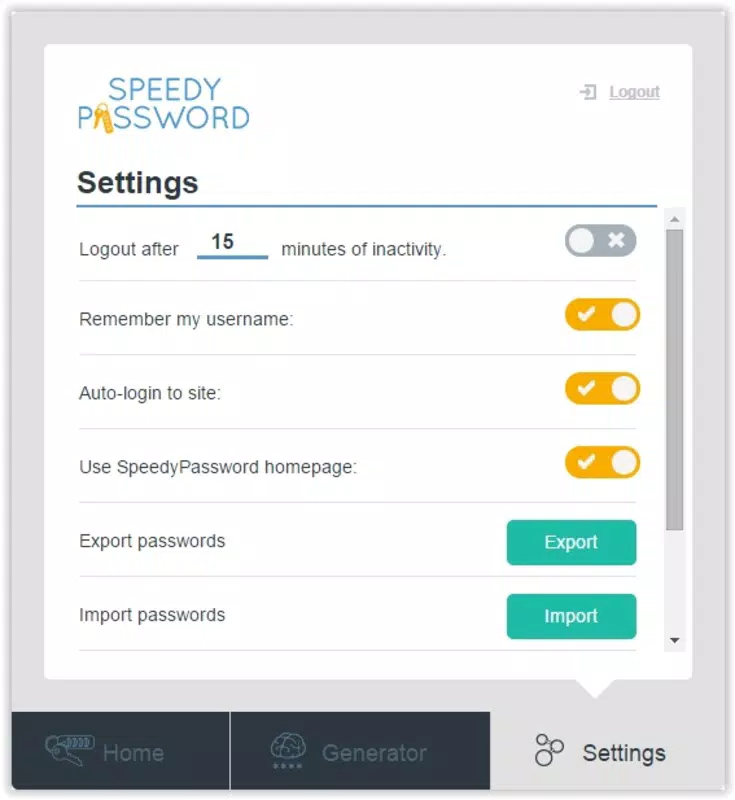
- User-Friendly Interface: The app features an intuitive design with a clean layout and straightforward navigation. The setup process is minimal and accessible, making it suitable for users of all technical skill levels, including those new to digital security tools.
These features work together to create a holistic experience that balances security, ease of use, and functionality. For example, a user managing several online banking accounts can generate a unique master password, store login details securely, and check news updates all within one interface—reducing the risk of exposure and enhancing overall digital efficiency.
Interface, UX & Performance
The interface of Speedy Password reflects a clean, minimalist design philosophy focused on usability and clarity. The layout is organized into clearly labeled sections, with intuitive icons and logical flow between functions. Users can easily navigate from the master password generator to the saved credentials list and the integrated news feed, minimizing friction during daily use.
Navigation is consistent across screens, with a bottom or top bar menu providing quick access to core features. The visual style uses neutral colors and readable typography, reducing eye strain and enhancing readability on both small and large screens. Interaction elements such as buttons and input fields are appropriately sized, improving touch accuracy and accessibility.
Although the developer did not list formal performance metrics, the app appears to be optimized for responsiveness across different device categories. Users can expect smooth transitions between views and minimal lag during operations such as password generation or data retrieval. Stability is maintained through secure session handling, with no reported issues related to crashes or freezes during typical use.
Performance may vary depending on device capabilities, but the app’s lightweight architecture suggests it runs efficiently on mid-range and high-end smartphones. The absence of heavy animations or resource-intensive background processes contributes to consistent operation, even on older models.
Platform Compatibility & Technical Requirements
Speedy Password is available on Android, ensuring broad accessibility across a wide range of devices. The app is designed to run on modern Android operating systems, though specific version requirements were not disclosed by the developer. Users are advised to ensure their device is running a current version of Android for optimal compatibility and security.
The file size of the application is 12.4 MB, which is relatively compact for a security-focused tool. This size suggests efficient coding practices and minimal bloat, making it suitable for devices with limited storage space. The lightweight nature of the app also contributes to faster download and installation times.
Although the developer did not specify minimum OS requirements or hardware specifications, the app’s design implies support for devices with standard processing power and memory configurations. For users seeking the latest features and security patches, installing the most recent version of the app is recommended.
Pros and Cons
Pros
- Strong focus on security with 256-bit AES encryption
- Customizable master password generation with full control over complexity
- Intuitive interface suitable for users of all experience levels
- Session-based password memory enhances usability without compromising safety
- Integrated news access adds value beyond core password management
- Compact file size improves installation speed and storage efficiency
Cons
- Specific OS version requirements were not listed
- Developer background and company details were not provided
- No information on cloud sync or cross-device functionality
- Limited visibility into update frequency or long-term support plans
- No mention of biometric authentication options such as fingerprint or face ID
FAQ
Is Speedy Password safe to use?
Yes, Speedy Password uses 256-bit AES encryption, which is widely recognized as one of the most secure encryption standards. Your passwords are encrypted locally and cannot be accessed by the app itself or any third party.
Can I use Speedy Password on multiple devices?
The developer did not disclose information about cross-device synchronization. As such, it is unclear whether the app supports data sharing across multiple devices.
Does Speedy Password require internet access?
While the app functions offline for core password management, the integrated news feed may require an internet connection to load content.
How often does Speedy Password receive updates?
Specific update frequency was not provided by the developer. Users are encouraged to check the app store regularly for the latest version.
Is biometric authentication supported?
There is no information available about fingerprint or face ID integration. The app may rely solely on the master password for access.
Final Thoughts
Speedy Password stands out as a dependable tool for individuals seeking to strengthen their online security without sacrificing usability. Its combination of customizable password generation, robust encryption, and a user-friendly interface makes it a solid choice for managing digital identities. The inclusion of news access adds a unique value proposition, transforming it from a standard utility into a multifunctional companion for daily online activities.
While some technical details remain undisclosed—such as specific OS compatibility and sync capabilities—the app’s long-standing presence and focus on privacy suggest reliability and ongoing development. For users who prioritize data protection and want a streamlined way to manage passwords and stay informed, Speedy Password delivers strong value.
Download Speedy Password now


